Important: How We’ll Contact You & How to Find Our Reply
To comply with Amazon’s policies, which are in place to protect your privacy and ensure all communication is securely logged, we will contact you through Amazon’s official Buyer-Seller Messaging service. Once you submit your Amazon order number in the form below, we will use it to locate your purchase and then contact you within the Amazon system.
However, if you have opted out from receiving non-critical messages on Amazon, we will unfortunately be unable to initiate contact with you via Buyer-Seller Messaging. In this scenario, we kindly request that you proactively check your Amazon messages for our reply after submitting your order number.
Alternatively, you can reach out to us by replying to your original order confirmation message or by navigating to your order details on Amazon and selecting “Contact Seller.” We encourage you to temporarily adjust your communication preferences within your Amazon account settings if you wish to receive our messages directly.
Please check our FAQs on this page if you need more information.
We’re here to help with your recent purchase. To get started, please provide your Name, Amazon Order ID and Message in the form below.
Frequently Asked Questions
I submitted my Order ID. How will I know when you’ve replied?
We will send a message to you via the Amazon Buyer-Seller Messaging service. The best way to ensure you see our reply is to proactively check your Amazon Message Center (Account > Message Center). While Amazon may send you an email notification to your personal email address alerting you that you have a new seller message, it’s always best to log in and check directly.
How long will it take for you to respond to my inquiry?
We strive to respond to all customer inquiries submitted through this page within 24 business hours. Please note that “business hours” typically refer to Monday-Friday, excluding public holidays. We appreciate your patience!
What if I don’t see a reply from you after the stated timeframe?
Please first double-check your Amazon Message Center, ensuring you’re looking in the correct section. Also, verify that the Order ID you provided was accurate. If you’ve done this and still don’t see a message after the expected response time (e.g., 48 business hours), please feel free to resubmit your Order ID through this page, just in case there was an issue with the initial submission.
Is my information secure when I provide my Order ID here?
Yes, we treat your information with care. The Order ID you provide is used solely for the purpose of locating your order on Amazon and initiating communication through Amazon’s secure Buyer-Seller Messaging platform. We do not store it for other purposes or share it. All subsequent communication will occur within Amazon’s encrypted environment.
Where exactly do I find these Amazon messages?
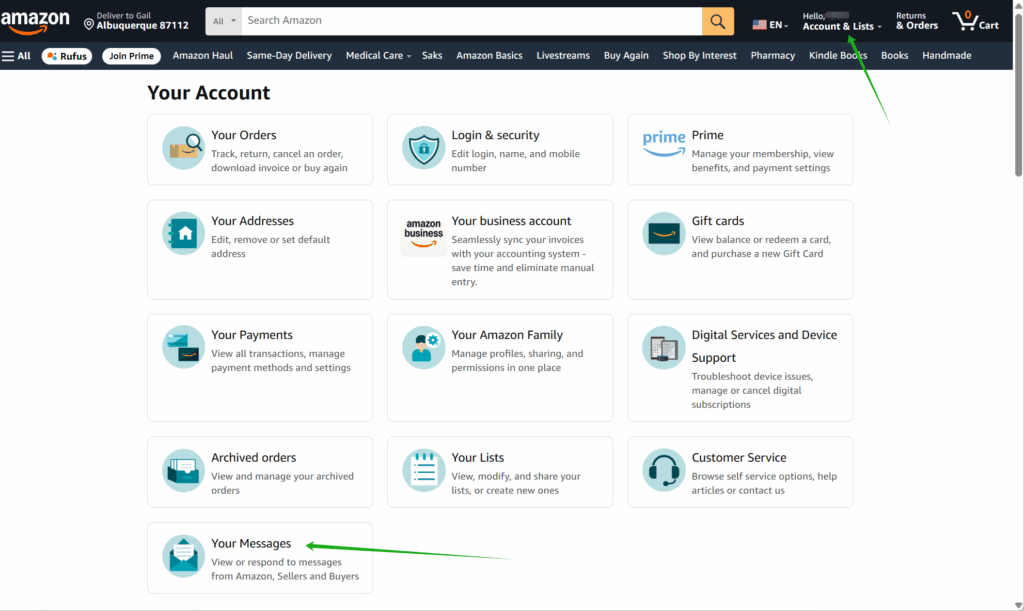
If you are on your PC,
– Log in to your Amazon.com account.
– Click on “Account & Lists” (often in the top right corner).
– Click on “Your Messages”
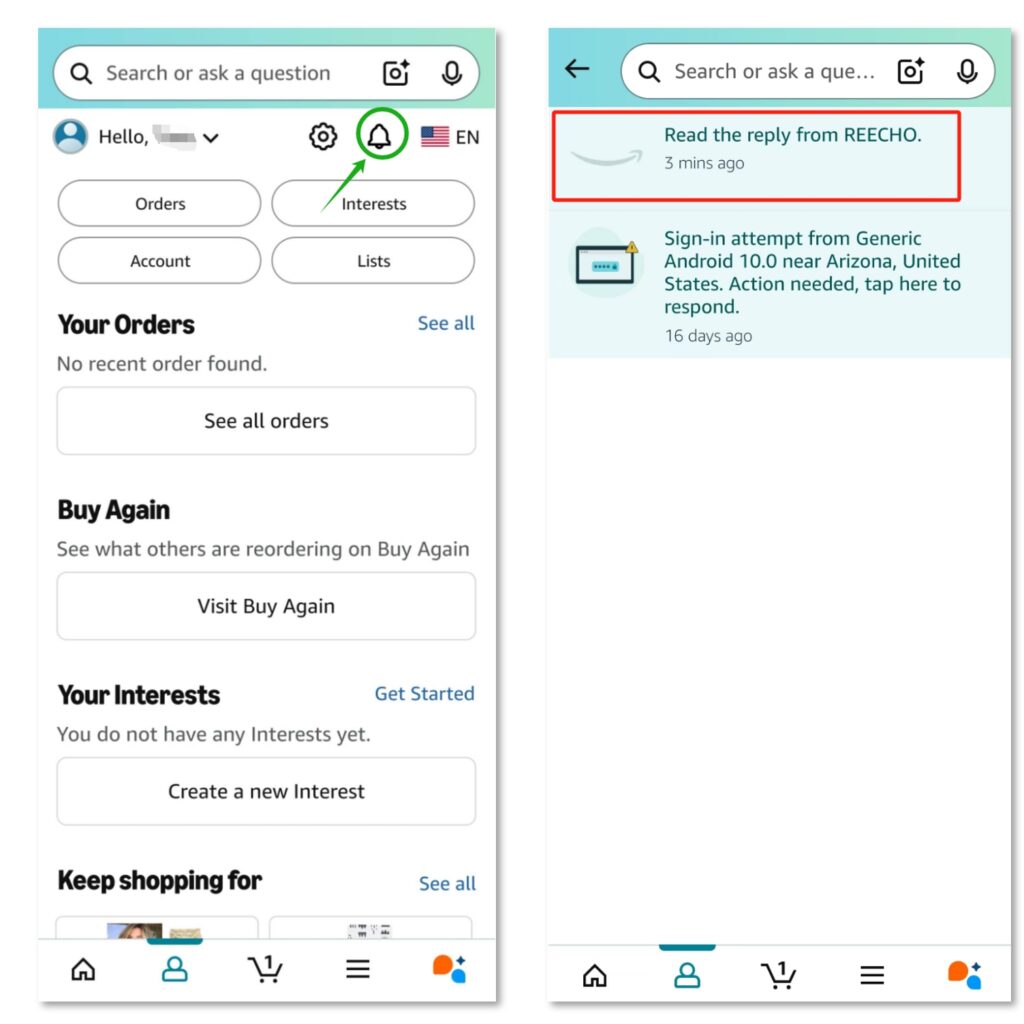
If you are on the Amazon mobile app,
– Go to Your Profile, which is to the left of the shopping cart icon.
– Click on the Bell button to find recent notifications
– Find the Message from REECHO
Why do you need my Amazon Order ID?
Your Amazon Order ID is crucial for us. It allows us to quickly and accurately locate your purchase details, understand your order history, and provide you with the specific support you need. Without it, we cannot access your order information within the Amazon system.
I’m worried my Amazon messages go to spam or I don’t see them. What can I do?
While messages within Amazon’s system don’t typically have a “spam” folder like traditional email, it’s important to actively look for new messages. Make it a habit to check your Amazon Message Center if you’re expecting a reply. You can also check your Amazon notification settings to ensure you’re set up to receive alerts for new seller messages (though relying on direct checks is more foolproof).